
Overview
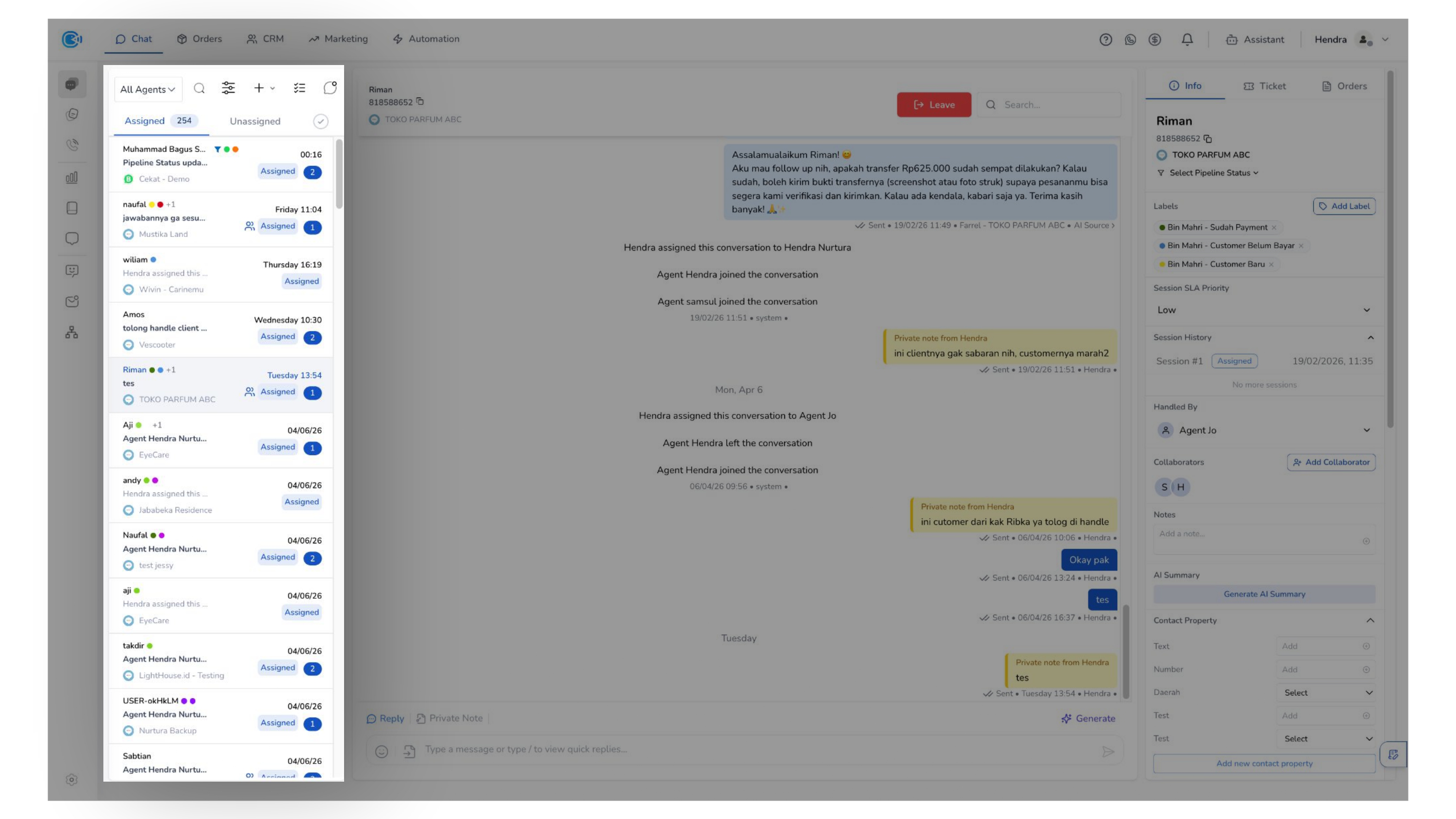
The Omnichannel Chat interface is your main workspace for managing customer conversations across multiple communication channels.
From this page, you can monitor incoming messages, respond to customers in real time, manage conversation status, and access detailed information for each interaction.
This interface is designed to support end-to-end conversation handling—from the moment a message is received until it is resolved—while ensuring that every customer interaction remains organized, trackable, and connected to relevant customer data.
To help you navigate efficiently, the interface is divided into three main sections:
1. Conversation List
Located on the left panel, this section displays all incoming conversations, including both assigned and unassigned chats.
You can use this section to browse, prioritize, and select conversations that require your attention.
2. Conversation Room
Positioned in the center, the Chat Box is where you interact directly with customers.
Here, you can send replies, share media, review conversation history, and update the conversation status.
3. Conversation Details
Located on the right panel, this section provides detailed information about the selected conversation.
You can view customer data, assigned agents, labels, notes, and other relevant attributes to support more informed and contextual responses.